
How can I prevent Mobile Fence from being disabled?
To prevent Mobile Fence from being deleted or stopped, please complete the following settings on your child's device.
1. Enable the 'Block Settings' rule
If access to system settings is allowed, your child may stop the Mobile Fence service or revoke essential permissions; therefore, you must block access to prevent any changes to these settings.
Failure to block system settings may result in issues such as "incorrect usage time statistics, abnormal monitoring, inability to track location, excessive usage beyond allowed time, or app deletion." In such cases, you will need to reinstall the app and restore permissions.
Rule Settings → Apps → System Blocking → Block Settings
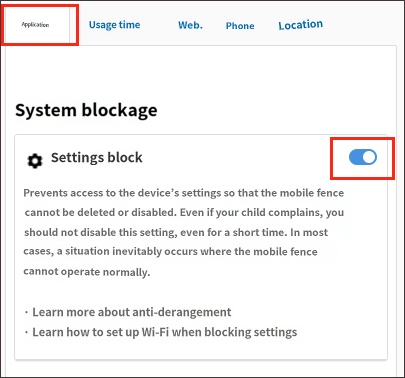
• Related article: How to configure Wi-Fi when blocking settings
2. Block Safe Mode
Safe Mode is entered by pressing the volume down (-) button during device boot-up, and it prevents the execution of any apps other than those pre-installed by the manufacturer. In this mode, the Mobile Fence app does not function properly, allowing your child to potentially delete the app or revoke essential permissions.
Please use the Safe Mode blocking feature (supported on Samsung and LG devices) to manage this.
2) Device Settings → MDM Agent → Click 'Turn On'
3) Block Safe Mode → Click 'Turn On'
1) Run the Mobile Fence app on your child's device → Click the Parent Mode button → Log in
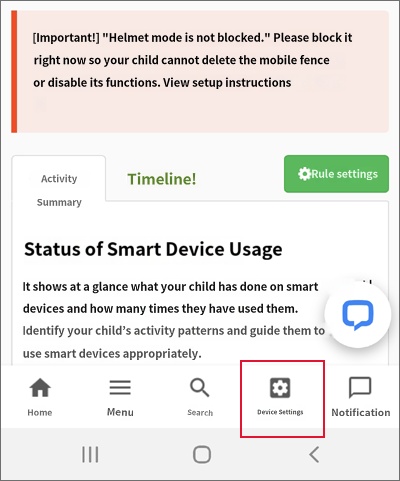
2) Device Settings → MDM Agent → Click 'Turn On'
3) Block Safe Mode → Click 'Turn On'


For LG devices, an add-on installation will proceed when clicking MDM Agent. For detailed instructions, please refer here.
3. Block Factory Reset (Optional)
A factory reset wipes all data on the device and restores it to its original factory state. Enabling the 'Block Factory Reset' feature can prevent the app from being neutralized via a reset.
Follow these steps to set it up:
1) Run the Mobile Fence app on your child's device → Click the Parent Mode button → Log in
2) Device Settings → Block Factory Reset → Turn On
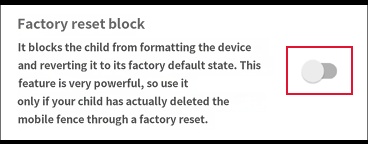
This feature is very powerful; if the device password is lost, not even a service center can unlock it, and the device board will need to be replaced. Please configure this carefully after confirming that your child is attempting a factory reset.
4. RAM Management Exclusion (Optional)
Mobile Fence is designed to function normally even during RAM optimization; however, if the app is force-closed by the device's RAM management feature, please add it as an exception.
http://mobilefence.com/kms/18749382
5. Other
- If the device is an LG, the following additional settings are required:
http://mobilefence.com/kms/60647540
Some Samsung devices may not support Knox technology, making it impossible to enable the Block Safe Mode setting. Please check the list of supported devices at the link below:
https://www.samsungknox.com/ko/knox-platform/supported-devices

