
뒤로
How to monitor all SMS message content
Last updated :
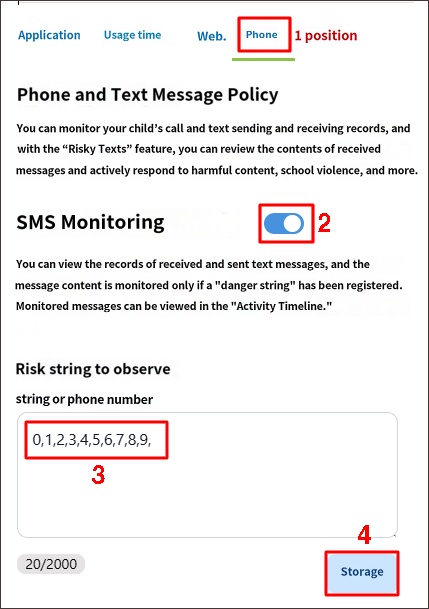
To monitor all text message content on your child's device, enter 0,1,2,3,4,5,6,7,8,9 separated by commas in 'Risk Keywords to Monitor' and save.
Mobile Fence Login → Rules → 'Phone' tab → SMS Monitoring 'ON' → Enter 0,1,2,3,4,5,6,7,8,9 in Risk Keywords to Monitor → Save
Message content prior to the setting cannot be viewed; only messages received after the completion of the settings above will be monitored.
MMS messages containing photos are not monitored, and the 'MDM Agent' feature must be activated on the child's device to monitor text/call logs.

