
EC-2

"Usage tendencies" statistics  

Last updated :

You can check your child's smartphone usage time for today in the "Usage Trends" statistics.
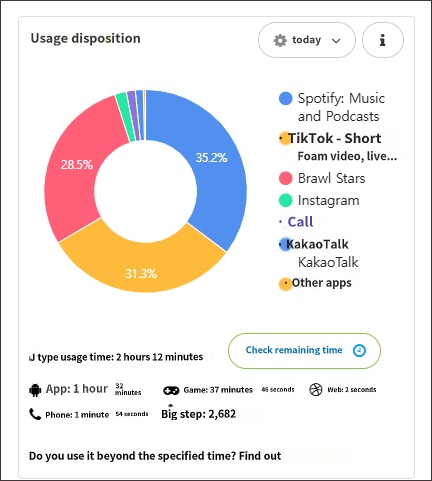
Usage Trends statistics screen


The following is help information regarding "Total Usage Time".

  • The usage time of apps set to "Always Allowed" is also included in the "Total Usage Time," so the actual total usage time may appear longer than the daily device usage limit you have set.
  • The "Phone" category refers to call duration, not app usage time. Although call duration is not subject to the daily device usage limit, it is added to the "Total Usage Time," which may cause it to appear greater than the daily device usage limit.
  • Call time occurring in the background is not deducted from the device usage time and is not affected by the device usage limit settings.
  • To view usage excluding apps set to "Always Allowed" and call duration, tap the options button and check "Exclude 'Always Allowed' and call time." Once this option is selected, the "Today" button will change to "Today + Excluded."
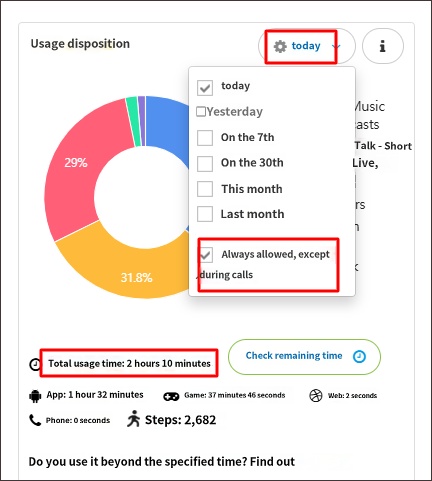
 

"Exclude 'Always Allowed' and call time" option


• Related Topics

Can I limit smartphone usage to only 3 hours a day?

Usage after daily usage limit is exceeded

Timeline logs are not visible

Contact Us

Before inquiring...Have you been looking for this answer?
โ€ข How to block child disable Mobile Fence app?
โ€ข I want to know how to uninstall MobileFence app.
โ€ข Does a parentsโ€™ device get blocked?
โ€ข How to see the contents of Text?

An error has occurred while registering your question.
Your question has been successfully registered.
We will get back to you within 24 hours on weekdays. Thank you!

By providing related screens, we can process your inquiry more precisely and quickly.

Contact Us

Before inquiring...Have you been looking for this answer?
โ€ข How to block child disable Mobile Fence app?
โ€ข I want to know how to uninstall MobileFence app.
โ€ข Does a parentsโ€™ device get blocked?
โ€ข How to see the contents of Text?

An error has occurred while registering your question.
Your question has been successfully registered.
We will get back to you within 24 hours on weekdays. Thank you!

By providing related screens, we can process your inquiry more precisely and quickly.